
Why are systems designed for people often hardest for people to navigate?
The answer lives in who actually designs these systems. Healthcare forms are built by administrators. Government portals by IT contractors. Insurance processes by legal teams. The person navigating it is consulted last, if at all — and by then, the architecture is already set. The system optimizes for the institution's logic, not the human's confusion. Built for people. Designed by process.
SOCIETY & SYSTEMSALL POSTS
Whystill
6/30/20267 min read
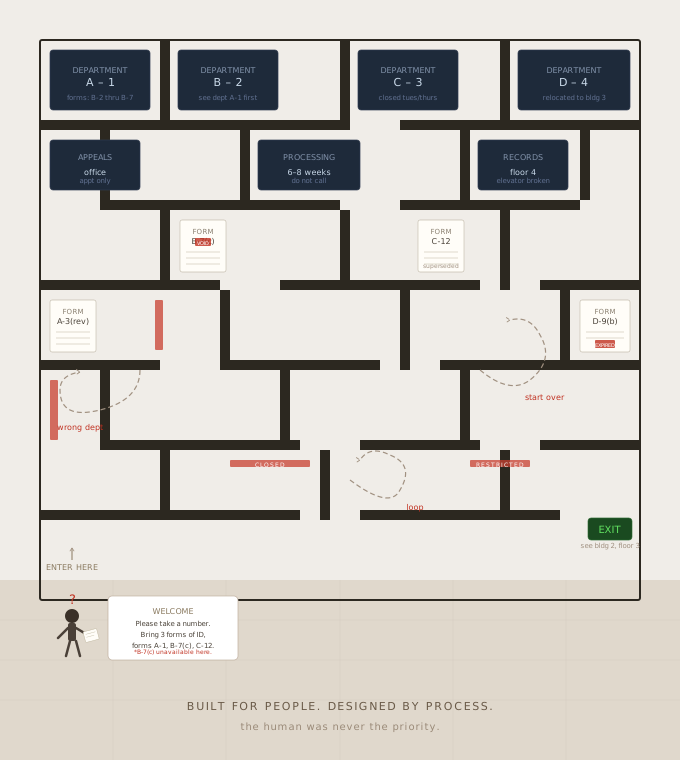
The Paradox of User-Centric Design
User-centric design aims to create systems that cater directly to the needs, preferences, and behaviors of the end user. At first glance, one might assume that understanding user requirements will naturally lead to more intuitive and effective designs. However, this perspective can foster a paradoxical situation: the more designers try to account for user preferences, the more complicated systems often become.
This complication arises primarily from inherent assumptions that designers make about their users. When designers attempt to predict user behavior, they may not account for the diversity of user interaction patterns or the varying contexts in which a system is used. For example, a system developed for a specific demographic might overlook the needs of users from different backgrounds or with different levels of technological acumen. Consequently, rather than enhancing the usability of the design, such assumptions can lead to systems that feel alienating or confusing.
Further complicating matters are the shifting dynamics of technology and user expectations. As digital landscapes evolve, user preferences may change rapidly, meaning that designs which were once deemed intuitive can quickly become outdated or mismatched with user needs. This fluidity not only challenges designers to continuously adapt their systems but can also lead to frustration among users who find that their needs are no longer met by previously navigable interfaces.
In essence, the initial goal of user-centered design—to create systems that enhance accessibility and intuitiveness—can inadvertently result in convoluted systems. Tensions between understanding user intentions and the realities of design can create a dissonance where systems, despite being user-focused, present considerable navigation challenges. Acknowledging these complexities is essential in ensuring that user-centric designs do not sacrifice clarity and effectiveness in their pursuit of meeting user needs.
Cognitive Overload: Too Much Information
Cognitive overload occurs when individuals are exposed to an excessive amount of information or too many choices, leading to diminished decision-making and navigation effectiveness. This phenomenon is particularly relevant in the context of system design, where a user’s ability to comprehend and interact with a system can become severely impaired due to overwhelming stimuli.
Human cognitive limitations are well-documented; the brain can only process a finite amount of information at any given moment. When systems present users with numerous options, it can lead to confusion and frustration. Factors such as the complexity of information, the number of choices available, and the format in which data is presented can contribute to this overload. For example, a website cluttered with excessive hyperlinks, advertisements, or navigation menus can drive a user to disengage altogether.
Designers often strive to create comprehensive systems, inadvertently compounding this issue. In an attempt to provide users with all possible options, they may overlook the importance of clarity and simplicity. A common approach that mitigates cognitive overload is the "paradox of choice," which suggests that a limited selection can lead to more satisfying outcomes. By reducing choices, or presenting information in a more digestible manner, designers can create systems that are more user-friendly.
Furthermore, the presentation of information should be intuitive and organized, allowing users to filter through options more effectively. Visual hierarchies, clear labeling, and categorization can alleviate cognitive demand, guiding users through the necessary choices without overwhelming them. Incorporating feedback mechanisms also enables users to feel more confident in their decisions, ultimately leading to a more seamless navigation experience.
The Role of Terminology and Jargon
The use of specialized terminology and industry jargon can significantly hinder user experience in various systems, making navigation a daunting task for many. When systems are designed without considering the linguistic diversity and varying levels of expertise of their users, accessibility becomes a critical concern. Jargon often reflects specialized knowledge within a field, leading to the unintended consequence of creating barriers for those who are not familiar with such language.
For individuals encountering new systems, particularly in fields like technology, finance, or healthcare, encountering complex terms can foster confusion and frustration. This alienation can occur even among users who possess a reasonable level of competence in related areas, as industry-specific language can obscure understanding and impede effective interaction with the system. The necessity for clear, universally understood language becomes apparent when we consider the diverse backgrounds and experiences of potential users.
Moreover, users with limited familiarity with specific terminologies may feel intimidated or overwhelmed, leading to disengagement with the system. Such experiences often prompt a reevaluation of the design process, urging creators to prioritize clarity and accessibility. Implementing user-friendly language, avoiding unnecessary jargon, and providing straightforward explanations can serve to alleviate confusion and enhance user experience.
To mitigate these barriers, a user-centered design approach promoting inclusive language practices should be prioritized. By engaging with users from various backgrounds during the design process, developers can glean valuable insights that inform the creation of systems that are not only functional but intuitively navigable. In essence, recognizing the detrimental role of jargon, and actively working towards clear communication can pave the way for a more accessible and user-friendly experience.
User Experience vs. User Expectations
User experience (UX) refers to a user's overall interaction with a system, including its usability, design, and functionality. Conversely, user expectations are shaped by previous experiences and the preconceived notions users bring to a new system. The disparities between user experience and expectations are crucial elements that can complicate how intuitive systems are perceived, frequently leading to user dissatisfaction and confusion.
For instance, consider a popular online banking application. Users may expect the application to provide seamless navigation, quick access to features like account balance checks, and straightforward transaction processing. However, if the application is laden with a cluttered interface or if critical features are not easily accessible, the actual user experience deviates significantly from what users anticipated. This mismatch can lead to frustration, causing users to feel overwhelmed by the complexity of navigation.
Additionally, the rapid advancement of technology can exacerbate these fluctuations. Users may expect that any digital product will be easy to operate based on their experiences with other modern applications. If a system is antiquated in design or requires extensive steps to complete basic tasks, this discrepancy grows more pronounced. For example, if an e-commerce platform fails to remember user preferences or takes an excessive amount of time to process returns, customers may experience cognitive dissonance as their expectations of convenience clash with the reality of a cumbersome system.
Such discrepancies highlight the importance of aligning user experience with user expectations. A proactive approach in user-centric design involves capturing feedback, observing user interactions, and continuously adapting the system to meet users' needs. By prioritizing user expectations and enhancing the overall experience, developers can mitigate confusion and foster satisfaction among users.
Overengineering and Complexity
Overengineering refers to the process of designing systems that are unnecessarily complex or feature-rich, often resulting from a desire to utilize the latest technologies or to include every possible functionality. While the intention behind overengineering may be to enhance user experience, the reality is that it frequently leads to systems that are harder for people to navigate. This phenomenon occurs as developers become overly focused on the technical aspects of a project, frequently at the expense of usability and intuitiveness.
A prominent instance of overengineering can be observed in software applications that boast extensive features. For example, a project management tool might integrate multiple functionalities such as time tracking, budgeting, and analytics, alongside its primary task management features. Although these additions could be perceived as valuable, they can create confusion among users who may only require basic project tracking. When users struggle to locate the functionalities they need amidst a plethora of options, the inherent value of the system diminishes significantly.
Case studies in various industries highlight how simpler, more streamlined systems can yield superior outcomes. For instance, an organization’s transition from an overly complicated inventory management system to a more straightforward, user-friendly alternative resulted in a marked increase in employee satisfaction and a reduction in error rates. Users reported that the intuitive design allowed them to complete their tasks more efficiently, demonstrating that often, less is more when it comes to system design.
In industries ranging from healthcare to finance, the trend of overengineering not only leads to reduced user satisfaction but also can have serious implications for productivity. Therefore, it is critical for system designers to prioritize user-centered approaches, focusing on delivering the essential features that meet user needs without unnecessary complexity. By doing so, they can create systems that enhance productivity and are much easier for individuals to navigate.
Feedback Loops and Iteration
In the realm of system design, the incorporation of feedback loops and iterative processes is paramount. Feedback loops serve as mechanisms through which user experiences and interactions are continuously assessed, allowing for informed modifications to the design. These loops are instrumental in identifying pain points within navigation systems that users may encounter. By actively seeking user insights, designers can uncover specific usability challenges that may not be evident through theoretical frameworks alone.
One effective method for gathering user feedback is through usability testing. During this process, users are observed as they interact with the system, providing real-time insights into their experiences. Researchers can conduct these tests both in controlled environments and in the field, where natural user interactions can yield richer data. Additionally, surveys and interviews following these sessions can provide further context and depth to the feedback collected, allowing designers to uncover underlying issues.
Moreover, the iterative design process encourages continuous improvement based on collected feedback. Each iteration should aim to refine and enhance usability, thus creating a system that better accommodates the needs of its users. For instance, after identifying challenging navigation pathways through initial user testing, designers can implement revisions aimed at simplifying these routes. Subsequent testing can then verify the effectiveness of these changes. This cyclical approach not only elevates the system's usability but also fosters a co-creative relationship between designers and users.
By embedding iterative practices and utilizing feedback loops, designers can create more user-centered systems. These practices facilitate thoughtful revisions that take into account user experiences, advancing the project towards a fully navigable and intuitive outcome. While designing systems with users in mind is essential, actively listening to their feedback is equally crucial for achieving optimal usability.
Best Practices for Designing User-Friendly Systems
Designing user-friendly systems requires a thoughtful and systematic approach that prioritizes the users’ needs and experiences. One of the foremost best practices is to emphasize simplicity throughout the design process. A system should not introduce unnecessary complexity; instead, it should streamline processes and eliminate distractions. By stripping away superfluous features, designers can create an environment that users find intuitive and easy to navigate.
Clear communication is another cornerstone of effective design. Users should be able to immediately understand the purpose of various features and how to access them. This clarity can be enhanced by utilizing consistent terminology and visually distinguishing elements based on their functionalities. Furthermore, incorporating instructional elements such as tooltips or a guided onboarding process can significantly improve the user experience. By making instructions visible and comprehensible, users will feel more confident as they interact with the system.
User testing is an invaluable practice when creating a user-friendly system. Involving actual users during the testing phases allows designers to obtain critical feedback that can help identify navigational difficulties and usability issues. Iterative testing ensures that the system evolves according to users' experiences, leading to adjustments that enhance its overall effectiveness.
Finally, providing ongoing support is essential for maintaining user satisfaction. An easily accessible support system, whether it is through help forums, chatbots, or customer service representatives, ensures that users feel supported and can seek assistance when needed. Continuous updates based on user feedback can also help keep the system relevant and user-centric.
By following these best practices—focusing on simplicity, clear communication, user testing, and ongoing support—designers can develop systems that not only function seamlessly but also resonate with users’ needs, ultimately creating a more navigable and accessible experience.